Create Table in HTML with example
In this article, we discuss How to create table in HTML with example. A table is a collection of data arranged by rows and columns. Tables are very useful for demonstrating connections between data types, such as products and their costs, employment and planned dates, or flights and arrival times. In this article, you will learn how to create a table using HTML for example, customize it by adding the desired number of rows and columns, and add rows and columns headings to create your table easier to read.
What is a Table in HTML?
Creating tables in HTML
HTML tables allow you to sort data in rows and columns. These are most commonly used to display tabular data such as product listings, financial statements, customer details, etc.
You can create a table utilising the <table> element. Inside the <td> feature, you can use <tr> features to create rows, and you can utilise <td> elements to create columns within a row. You can designate a cell as a title for a class of table cells using the <th> element.
The following sample shows the most basic structure of a table.
<table class="MyHTML_Table">
<thead>
<tr>
<th>Header 1</th>
<th>Header 2</th>
<th>Header 3</th>
<th>Header 4</th>
</tr>
</thead>
<tbody>
<tr>
<td>1</td>
<td>2</td>
<td>3</td>
<td>4</td>
</tr>
<tr>
<td>5</td>
<td>6</td>
<td>7</td>
<td>8</td>
</tr>
<tr>
<td>9</td>
<td>10</td>
<td>11</td>
<td>12</td>
</tr>
<tr>
<td>13</td>
<td>14</td>
<td>15</td>
<td>16</td>
</tr>
</tbody>
</table>{codeBox}
<style>.MyHTML_Table {border:3px solid #C0C0C0;border-collapse:collapse;padding:5px;}.MyHTML_Table th {border:3px solid #C0C0C0;padding:5px;background:#F0F0F0;}.MyHTML_Table td {border:3px solid #C0C0C0;padding:5px;}</style>{codeBox}
Add a caption to the table
You may specify a caption for your table by using the <caption> HTML Tag. The <caption> tag should be placed immediately after the opening <table> tag. By default, the caption shows up at the top of the table, but you may change its position utilizing the CSS caption-side property.
The following example shows the best way how to use this tag element in a table.
<table class="MyHTML_Table">
<caption>My HTML Table</caption>
<thead>
<tr>
<th>Header 1</th>
<th>Header 2</th>
<th>Header 3</th>
<th>Header 4</th>
</tr>
</thead>
<tbody>
<tr>
<td>1</td>
<td>2</td>
<td>3</td>
<td>4</td>
</tr>
<tr>
<td>5</td>
<td>6</td>
<td>7</td>
<td>8</td>
</tr>
<tr>
<td>9</td>
<td>10</td>
<td>11</td>
<td>12</td>
</tr>
<tr>
<td>13</td>
<td>14</td>
<td>15</td>
<td>16</td>
</tr>
</tbody>
</table>{codeBox}
Generate HTML Table Online
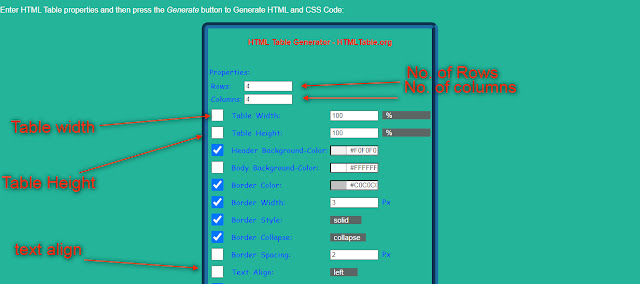
You can too use a free online HTML Table Generator like HTML Table Generator - HTMLTable.Org. To use this tool:
- First Go To HTMLTable.Org Then
- Enter No. of Rows And Columns
- After that, you may choose header colour, background colour and text colour.
- then click on Generate button.